
Among the various tools and terminologies used by the RPA automation architecture, it is essential to understand how these entities, such as automation, robots, tasks, alerts, workspaces, runners, logs, and development tools, work.
In this article, we will discuss what they are for and how they relate to each other while creating, orchestrating, managing, and finalizing a robot.
What is automation architecture?
Automation architecture involves creating the automation structure and its management and defining how robots and entities in the automation environment will interact.
In Robotic Process Automation (RPA), different types of automation architectures define how to implement it:
- Attended automation: when automation works on the user’s device and is triggered manually.
- Unattended automation: in this case, automations are executed on servers without the need for human interaction during execution. Workflows are self-starting, and the automation can schedule to run at predefined times or in real time.
- Hybrid RPA: Combines attended and unattended automation, providing automation for both front-end and back-end activities.
The orchestrator is a critical component in any automation architecture, whether RPA or not. It manages and scales the automation robots — including their deployment, task management, scheduling system, alerts, error management, and credentials, and groups users with different access levels.
Later, we will explain the relationship between robots and automation agents and provide some practical examples of applications for RPA.
How do automation and robots relate to run tasks?
Automation is the technology that uses robots to process the necessary tasks using runners. The runner is the tool that identifies these tasks that need to be executed and configures the environment on the machine where the execution will occur.
Robots are projects we develop using various technologies. It can be done using programming languages such as Python, Java, C#, etc., frameworks such as Selenium and BotCity Framework, etc., and low-code tools.
We create tasks through automation, whether to be added to the execution queue at the same time as their creation or to be scheduled. And the execution of these tasks is done by runners configured for automation.
💡 Find out more: Guide to managing the execution of your automation
In the example below, we have an automation that has a robot. Using automation, we created a task to be added to the queue now and two schedules that will run later.

Automation can only have one robot. Through this same automation, you can create more than one task, whether scheduled or executed on the spot, according to the availability of the runners. However, a robot can belong to more than one automation if necessary.

How can multiple runners help scale my automation architecture?
It is possible to scale the automation architecture using parallelism technology. Thus, as tasks are created and scheduled and the configured runners for automation are available, execution may be faster as it occurs in parallel. This differential can help with the scalability and efficiency of your robots.
Automation architecture in BotCity Orchestrator
From the BotCity orchestrator, you can make the robot available to run through the “Easy Deploy” functionality. The first step is to create automation. The second step is to create a robot related to this automation. The third step is to inform the runner where the automation robot will execute.

💡 Learn more: Easy deploy documentation
From there, we need to create the tasks. In this case, we can use the “new task” functionality, for example.
💡 Learn more: Automation management and how to manage RPA tasks

Or, as mentioned previously, you can create schedules for your tasks. And in the BotCity orchestrator, click on “Schedules” in the “Operation Tools” menu to make the schedules:

💡Learn more: Schedules documentation
What entities and functionalities are related to automation tasks?
Other entities are related to the tasks we create to automate their respective processes. These entities are alerts, errors, and result files.
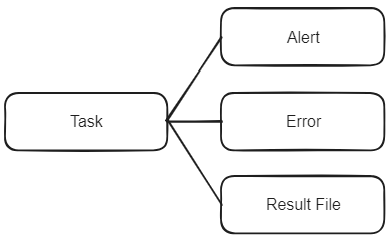
These connections can be created through integration via the BotCity Orchestrator API, through schedules, directly through the orchestrator interface, or even from the Datapool. If you don’t already know this last functionality, consult the Datapool documentation.

How do workspace or organization entity relationships work?
The workspace or organization is the work area within BotCity Orchestrator. We can relate integrations, audit functionality, and runners to this workspace.
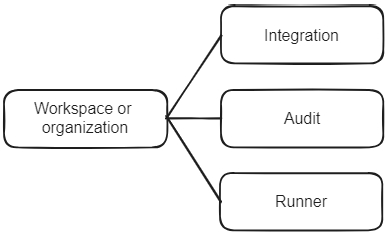
It is important to remember that the same runner can execute more than one automation, but the runner belongs to the workspace. This is a standout feature of BotCity Runner. It has no relation with the repositories (which within user group management are the set of automations created). In other words, it does not limit who can run the automation within that runner.
On the following screen, we have a demonstration of the integrations screen, with some examples of what can be integrated, such as Google Data Studio, Slack, and also Microsoft Teams:

On the screen below, we have the audit screen, with some filters and types of registered information:

Our documentation provides more information and guidance on integrations and auditing.
RPA automation architectural scenarios
Let’s check how all these entities generally relate to each other, considering some scenarios to analyze and understand how they work.
The image below shows three automations: A, B, and C. Following the model, we demonstrate how the runners relate between the automations and their corresponding workspace.

Scenario A
More than one automation for the same robot with more than one runner:
For example, let’s explore a hypothetical case of a lawsuit search robot and what the entity relationship would be using an automation orchestrator, in this case, BotCity’s RPA orchestrator.
Robot Search for Legal Processes in Automations A and B:
- We deploy the “Judicial Process Search” robot in the orchestrator;
- From this robot, we created “Automation A”;
- In this automation, we defined that Automation A will execute in runners:
- VM_00;
- VM_01;
- We created “Task 0” and “Task 1” to execute “Automation A”;
- Using this same robot, we also created “Automation B”;
- In this automation, we define that Automation B will execute in the runner:
- VM_02;
- We created “Task 2” and “Task 3” to execute “Automation B”;
- In this automation, we define that Automation B will execute in the runner:
- Remembering the Robot x Automation x Task x Runner relationship:
- A robot can be related to more than one automation. And tasks are created through automation. In specialized automation orchestrators, defining which runner these tasks will be executed is possible.
- So what will happen to the “lawsuit search” robot:
- Depending on the availability of runners VM_00 and VM_01, they will pull the tasks corresponding to Automation A, which are Task 0 and Task 1. It may be that each task is executed in a different runner, or it may be that one of the runners is busy, and both tasks are completed on the same runner. This will significantly help with parallel processing and scalability.
- Runner VM_03 will pull Task 2 and Task 3 from Automation B to be executed on it.
Scenario B
With just one automation for a single robot and with a single runner:
Automation Financial Conciliation Robot C:
- We deploy the “Financial Conciliation” robot in the orchestrator;
- From this robot, we created “Automation C”;
- In this automation, we defined that it can be executed in runner VM_03;
- We made “Task 4” to run “Automation C”;
- So what will happen to the “Financial Conciliation” robot:
- Depending on the availability of runner VM_03, it will pull Task 4 from Automation C to be executed on it.

Scenario C
With two automations for a robot with just one runner:
Robot Data Validation of Automations A and B:
- We deploy the “Data Validation” robot in the orchestrator;
- From this robot, we created “Automation A”;
- This automation can be considered, for example, for a testing environment;
- In this automation, we defined that it can be executed in runner VM_00;
- We created “Task 0” and “Task 1” to run “Automation A”;
- So what will happen to the “Data Validation” robot:
- Depending on the availability of runner VM_00, it will pull Tasks 0 and 1 from Automation A to be executed on it.
- Using this robot, we can also create “Automation B”:
- This automation can be considered, for example, for the production environment;
- In this automation, we defined that it can be executed in runner VM_00;
- We created “Task 2” and “Task 3” to run “Automation B”;
- Separating environments can help with validation and add an approval step to guarantee the quality and safety of your robots.
Relationship between log entities, credentials, and datapool
These entities do not have any direct relationship with the others. They can work separately. Except for Datapool, which has a weak relationship with tasks.

Logs, credentials, and Datapool can be created in addition to your RPA automation. But you can relate these features, considering their use in your robot’s code. You can explore these features in our logs, credentials, and Datapool documentation.
All set to structure the automation architecture of your RPA projects?
You can explore all the features by creating your free account and joining our global RPA community. To do this, join our Slack community or contact us via our forum.
If you have any questions, call us! And share with us in the comments how your automation architecture works.