During the execution process of our intelligent automations, we may need to handle RPA result files. These files can be of various types, such as screenshots, reports, execution data files, and more.
Additionally, there may be a need to make these files available for analysis or to ensure they are accessible to other authorized team members.
These aspects are part of the management of result files in our intelligent automations. In this article, we will explore how to handle these files using BotCity Orchestrator.
Advantages of managing result files
There are several benefits to managing intelligent automation result files. Check out the main ones below:
Data organization and storage
Establishing a specific location and tool for saving files is essential. This process makes data retrieval easier when needed and prevents information loss.
Moreover, integration with cloud storage systems, such as BotCity Orchestrator, enhances accessibility and scalability.
Security and compliance
Implementing access control and regular audits ensures files are managed securely and in compliance with regulations. Audits also provide traceability, benefiting interested users.
Documentation: Users and access groups
Automating the file workflow
RPA bots can rename, manage, or categorize files automatically based on predefined criteria in the code, optimizing the workflow and reducing error risks.
For example, files can be generated, formatted, and sent directly to BotCity Orchestrator without manual intervention.
Integration with other tools and features
There are integrations with specific functionalities for handling files, from extracting data from documents to generating reports integrated with ERP or CRM systems if needed.
These practices help companies maximize the value of automation-generated results, reducing costs, improving operational efficiency, and ensuring compliance and security in their processes.
How to manage result files in BotCity Orchestrator
In our example automation, we have a bot that registers people for job vacancies and, at the end, takes a screenshot of the screen to confirm the registration was successful. These screenshots serve as our result files, which will later be analyzed by the company’s HR department.
To enable your bot to send the result file to BotCity Orchestrator, your code needs to connect to it. The first step is to import the BotCity Maestro SDK:
For this example, since we will take a screenshot of the screen, we need to execute the following command after completing the registration:
Next, we must call the function that will send the file to the Orchestrator after the process execution:
To better understand this function, here are the definitions of each parameter:
-
task_id: The ID of the task being executed, generated by the Orchestrator.
-
artifact_name: The name of the file.
-
filepath: The file path.
With this setup, your code is now integrated with BotCity Orchestrator and, once executed, should generate the files for you.
You can access the files within the generated and executed task under the “Result Files” tab.
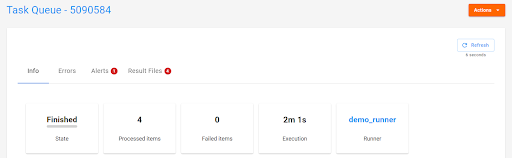
Clicking on “Result Files” will allow you to view the generated files.
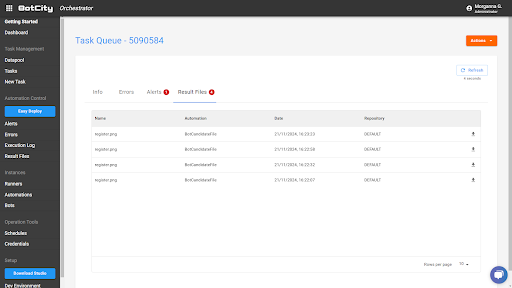
Alternatively, you can track the generated files from the left-side menu in BotCity Orchestrator by clicking on “Result Files.” Simply filter according to your needs to locate the files.

Remember that not only image files can be stored in Result Files. You can also work with .csv, .pdf, and other file types.
Documentation: Result Files
What do you think about RPA result file management?
We hope this article has clarified your doubts about RPA result files. As we have seen, there are many advantages to managing them properly.
So, to test the functionalities presented, create your free account on the platform and follow the step-by-step guide. If you have any questions, join our community to exchange experiences about the world of RPA automation!